

Pipedrive Review 2026: The Best CRM for Sales Teams?
In this Pipedrive review, we ran a paid account for two weeks, moving real deals through it daily, to see whether its narrow, sales-only focus is a strength or a limitation. Pipedrive doesn’t try to be a marketing platform, a help desk, and a CRM at once — it does one thing, and builds everything around that.
NudgeScore: 7.8/10
- Ease of Use: 8.5/10
- Value for Money: 8.0/10
- Feature Depth: 7.0/10
- Support Quality: 7.5/10
- Integrations: 8.0/10
Verdict up front: worth it if your team’s main job is moving deals through a pipeline and nothing else. Not the right fit if you also need marketing automation or a help desk bundled into the same tool.
What Is Pipedrive?
Pipedrive is a CRM built specifically around the sales pipeline, not around marketing or customer service. Every screen in the product is designed to answer one question: what deal needs attention next. There’s no separate “Hub” system to navigate and no bundled marketing suite sitting behind a paywall — the pipeline is the product.
That focus is also its boundary. Teams that need email marketing, landing pages, or a support ticketing system alongside their CRM will end up bolting on separate tools rather than finding them inside Pipedrive.
Pipedrive Pricing: Is It Worth the Money?
Plan Tiers
Pipedrive’s plans scale by feature depth rather than by a sharp free-to-paid cliff the way some CRMs do. Pricing changes periodically, so treat the breakdown below as a general guide and confirm current numbers on Pipedrive’s own pricing page before budgeting.
| Plan | Who It Suits | What You Gain |
|---|---|---|
| Essential | Solo users or very small teams | Core pipeline, contact management, basic reporting |
| Advanced | Small teams needing automation | Workflow automation, email sync, group emailing |
| Professional | Growing sales teams | Revenue forecasting, team reporting, richer permissions |
| Power / Enterprise | Larger sales orgs | Advanced admin controls, dedicated support options |
Unlike some competitors, there’s no permanently free tier — every plan requires payment after a trial period. The upside is that even the entry-level paid plan already includes a fully usable pipeline rather than a stripped-down teaser version.
Where the Cost Adds Up
The base plans are priced reasonably for what they include, but per-seat pricing means costs scale directly with headcount. A five-person team on a mid-tier plan lands at a noticeably different total than the advertised per-user rate suggests, since add-ons like enhanced automation or advanced reporting sit on higher tiers.
Pipedrive Features We Tested
Pipeline Customization
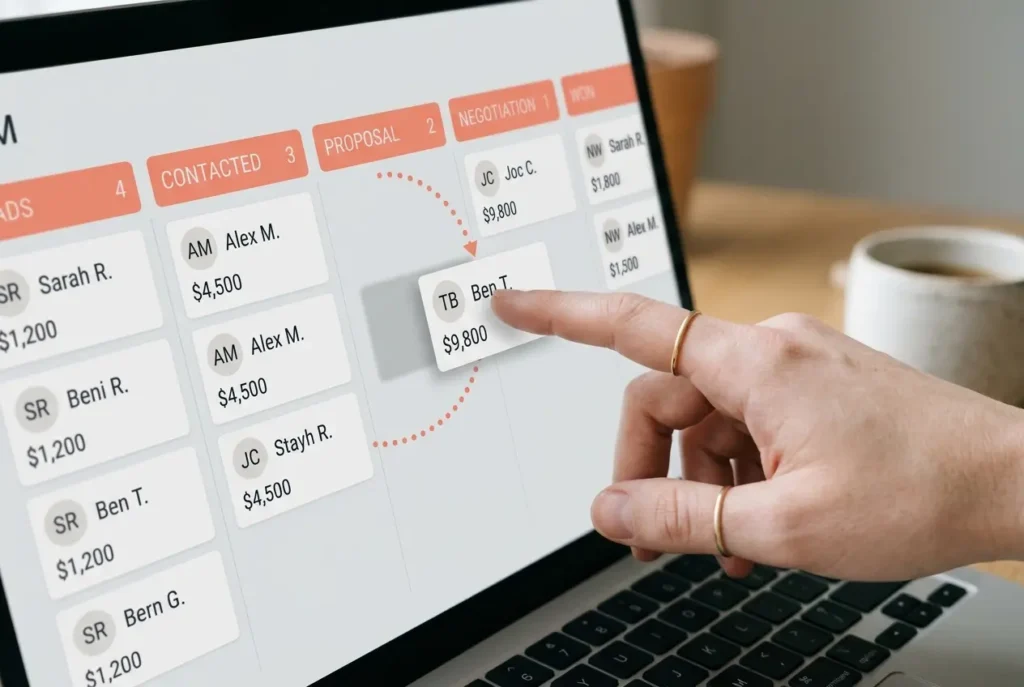
Building a custom pipeline with our own stage names took under fifteen minutes, and moving deals between stages was as fast as dragging a card, no lag noticed even with several dozen deals loaded in.
Email Sync and Templates
Two-way email sync with Gmail worked without issues once connected. Templates saved real typing time on repetitive follow-ups, though the template editor itself is fairly basic compared to more marketing-oriented tools.
Automation Workflows
Automation rules (move a deal, send a reminder, notify a teammate) were straightforward to set up, but they cap out quickly on lower plans. Anything beyond simple if-this-then-that logic pushed us toward the Professional tier during testing.

What We Liked (And What Frustrated Us)
The Good Stuff
- The interface stays out of the way — no clutter, no unnecessary tabs
- Setup took under an hour from signup to a working pipeline with real deals in it
- Mobile app mirrors the desktop experience closely, unusual for a CRM at this price point
- Support chat responded within minutes during testing, faster than expected
The Frustrating Parts
- No native marketing tools means email campaigns beyond simple follow-ups require a separate tool
- Reporting customization felt more limited than expected once we tried building anything beyond standard deal reports
- Some integrations required a third-party connector (like Zapier) rather than a native option
- Per-seat pricing adds up faster than it first appears for teams past five people
Pipedrive Alternatives Worth Considering
Teams that need marketing tools bundled with their CRM are usually better served by HubSpot — see our full HubSpot vs Pipedrive breakdown for a direct comparison. Freelancers and solo operators looking for something even lighter should check our best CRM for freelancers roundup.
Pipedrive Review Verdict: Should You Use It?
Buy it if your team’s core need is a clean, fast sales pipeline and nothing else — Pipedrive does that one job better than most CRMs on the market. Skip it if you need marketing automation, a help desk, or heavier reporting bundled into the same platform, since you’ll end up paying for and managing separate tools anyway.
Final NudgeScore: 7.8/10 — built purely for sales, and it shows, for better and for worse depending on what your team actually needs.
Frequently Asked Questions
Is Pipedrive good for a small team with no dedicated sales ops person?
Yes. The pipeline setup is simple enough that a small team can configure it without hiring anyone specifically to manage the CRM, which isn’t true of every tool in this category.
Does Pipedrive have a permanently free plan?
No. Pipedrive offers a free trial period but no free-forever tier, unlike some competitors that keep a limited free plan available indefinitely.
Can Pipedrive replace a marketing platform like Mailchimp?
Not fully. Pipedrive covers basic email sending and templates, but it isn’t built for full marketing campaigns, segmentation, or landing pages the way a dedicated marketing platform is.
How does Pipedrive handle multiple pipelines for different teams?
Multiple pipelines are supported on most paid plans, which works well for teams running separate processes, such as new business versus renewals, without mixing the deals together.
Is switching from another CRM to Pipedrive difficult?
Basic data migration through CSV import is straightforward for contacts and deals. More complex historical data, like custom fields from another CRM, usually takes extra mapping work during the import.
Does Pipedrive support team permissions and role-based access?
Yes, though granular permission controls are more limited on lower tiers and become more flexible on the Professional and higher plans.
Affiliate Disclosure: SaasNudge may earn a commission if you purchase through links on this page. We only recommend tools we’ve personally tested on paid accounts.